21 March, 2021

The Resource Database in SQL Server

 The "master" and "msdb" databases in a SQL Server installation are visible through SSMS.

However, every installation also includes a "Resource" database.  This is a static database which is not directly accessed or accessible.  It is installed into the SQL Server Version BINN folder and consists of both an "mdf" and "ldf" file.  This is where the actual definitions of system objects are stored.  This is the source database for definitions that "master" can read.  And this is the actual database that is upgraded when you do a SQL Server upgrade and may also be bundled in a patch release.

So, if you filter my SQL Server Log for entries referring to this before and after the CU23 patch that I applied recently, I see :

Resource Database Reference in SQL Server Log


Notice how the build version "14.00.2037"  got updated  to " 14.00.3381" when I applied CU23.

This Resource Database is how the "master" database update entries that I showed in my previous blog post are executed very quickly, most of them are links or hooks back to the Resource Database.


The Resource Database consists of the two files "mssqlsystemresource.mdf and mssqlsystemresource.ld" the SQL Server installed version "BINN" folder.  If you copy them out and attempt to attach the copy as a database, using SSMS, you get this error :

Error when trying to attach copy of Resource Database

with more details as :

Details on error attempting to attach copy of Resource Database


This is the Microsoft Documentation on the Resource Database 

When I run the queries shown in the Microsoft document, I get :

Resource Database Properties


Do not attempt your own Backup/Restore of this database.  But do ensure that your SQL Server Installation folder is backed up frequently, including after applying Service Packs and Cumulative Updates.  You would need to refer to this backup (or such a backup from another server having the same SQL Server Version and Patch Level) if you ever need to restore this database.


19 March, 2021

Patching SQL Server

 Starting with SQL Server 2017, Microsoft no longer releases Service Packs but only Cumulative Updates.

(I find this similar to Oracle releasing Release Updates, instead of Patch Set Updates, beginning with Oracle 12.2)

Refer to this page for the latest SQL Server Updates

This is the current SQLServer 2017 version I have on my desktop :

Current SQL Server Version query in SSMS

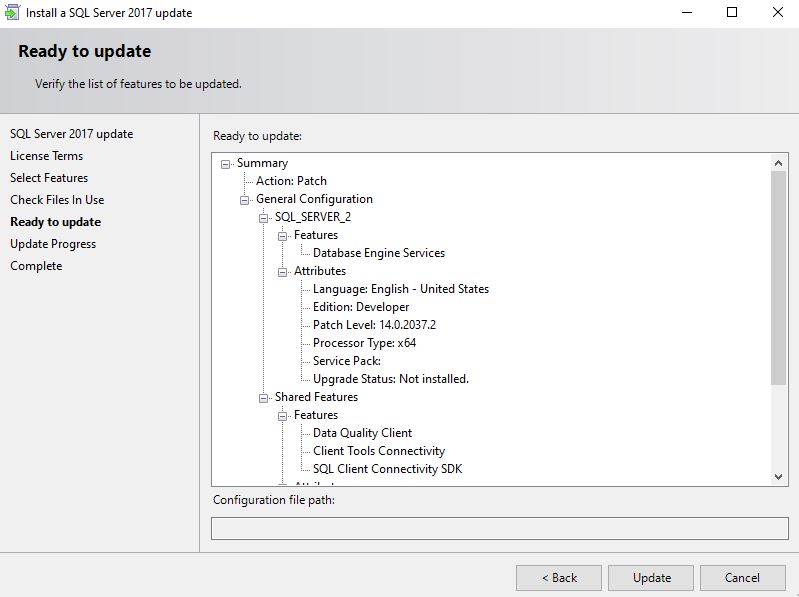
I have downloaded CU 23  (SQLServer2017-KB5000685-x64.exe) and proceed to apply this patch.

Installer Screen for SQL Server Cumulative Update


I have two separate installations of SQL Server on my desktop and choose to update only the second installation.

Select SQL Server Installation to update


I then confirm the location to install the Update


Confirm the Installation to be Updated


The installation proceeds and completes successfully

Installation of Update is in progress


Installation of Update is completed


When I query for the version, I see the updated version  -- CU23 has been applied

Version has been updated to CU23


Some DBAs have asked me.  Why is it that Oracle, after running "opatch",  has to run a separate datapatch to run SQL "Apply" actions when SQL Server does not need to do any SQL actions ?

The truth is that SQL Server Patching *does do* a lot of SQL "Apply" actions.  It is just that Microsoft does not ask you to run a separate datapatch command like Oracle.  An Oracle Home can have multiple databases so the patch for binaries is applied only once but the datapatch command has to be run for each database.  In the case of SQL Server all the databases in an Instance share common "master" and "msdb" database that are upgraded when you run the Patch Installer exe.  After applying those changes, it restarts the instance.

So if you want to identify the SQL Apply actions, look at the Archive (#1 or even #2) depending on the number of restarts.

In my case Archive#1 has 2,530 lines of entries over 36seconds.

I just show some of those entries here to prove that applying a SQL Server Patch also may involve a number of SQL Actions :

Here are some entries (from the bottom up) from Archive #1 of the SQL Server Log :


(There are 255 "Dropping signature" commands here)


(There are about 170 "Creating ..." commands here)


(about 30 "deprecated permissions")


(about70 "Creating ..." commands here)


                                                (and more Drops and Creates)


Some interesting entries here below :


And the final set of messages before the instance is shutdown :


The next startup then is when the Patching utility releases the Instance for usage.

So, Microsoft SQL Server Patching does do a large number of changes to "master" and "msdb" and configurations.  Do you go in and identify critical changes that need to be tested ?